Artificer Architecture Presentation: A Practical Template for Modern Visual Storytelling
When you are preparing to pitch a new startup, showcase an architectural portfolio, or present a quarterly business review, the visual structure of your deck matters just as much as the data itself. The Artificer Architecture Presentation template is designed to bridge the gap between raw information and compelling visual narrative. Rather than forcing users to build layouts from scratch, this resource provides a comprehensive framework of 35 handcrafted slides that serve as a foundation for professional communication. It is more than just a collection of backgrounds; it is a functional tool intended to streamline the creation process for creative agencies, corporate teams, freelancers, and educators who need to convey complex ideas with clarity and aesthetic precision.
Real-World Applications Across Professional Sectors
The versatility of the Artificer Architecture Presentation lies in its ability to adapt to distinct professional environments without losing its core identity. While the name suggests a focus on architecture, the underlying grid systems and minimalist aesthetics make it highly effective for a wide range of industries. Understanding where and when to deploy this template can save significant time during high-pressure projects.
Creative Agencies and Design Portfolios
For graphic designers, interior architects, and photographers, the primary challenge is often letting the work speak for itself without distracting design elements cluttering the view. This template utilizes pixel-perfect illustrations and clean picture placeholders specifically optimized for visual-heavy content. A freelance photographer preparing a client pitch can use the drag-and-drop image features to swap in their latest campaign shots within minutes. Because the graphics are fully resizable and editable, the layout maintains its integrity whether you are showcasing a panoramic landscape shot or a detailed product macro. The master slide structure ensures that typography and spacing remain consistent across all 35 slides, giving the portfolio a cohesive, gallery-like feel that impresses potential clients.
Startup Pitch Decks and Investor Relations
Entrepreneurs often struggle to translate abstract business models into tangible visuals. When pitching to investors, clarity is currency. The Artificer Architecture Presentation includes handcrafted infographics built directly in PowerPoint, eliminating the need to export charts from external software like Illustrator or Canva. If a founder needs to explain user growth or market segmentation, they can edit these vector-based infographics natively within the presentation file. This direct editability allows for last-minute adjustments based on investor feedback or updated metrics right before a meeting. The structured flow of the slides helps guide the narrative from problem identification to solution and financial projections, providing a logical scaffold that supports persuasive storytelling.
Corporate Profiles and Internal Reporting
In established business settings, consistency and brand alignment are paramount. Marketing managers and department heads frequently need to produce reports that adhere to strict corporate guidelines while remaining engaging. This template’s reliance on Master Slides means that global changes to color palettes, logos, or fonts apply instantly across the entire deck. Instead of formatting fifty individual slides for an annual report, a corporate communications team can update the master theme once and have a polished, branded document ready for distribution. The inclusion of vector icons also allows teams to create custom visual hierarchies for organizational charts or process workflows without licensing additional assets.
Educational and Personal Use Cases
Beyond commercial applications, this presentation template serves individuals in academic and personal development contexts. Educators and students often face the same engagement challenges as marketers: how to keep an audience focused on key takeaways. A university lecturer teaching urban planning or design theory can utilize the architectural motifs and infographic slides to break down dense theoretical concepts into digestible visual segments. Similarly, job seekers creating personal portfolios benefit from the template’s professional polish. In a competitive job market, presenting case studies in a well-structured format demonstrates attention to detail and design literacy, traits that employers value regardless of the specific role.
Technical Features Translated to Workflow Efficiency
Understanding the technical specifications of the Artificer Architecture Presentation is essential for maximizing its utility. However, features should always be viewed through the lens of practical outcomes rather than mere specifications.
- 35 Unique Slides: This volume provides enough variety to handle long-form presentations without repetition, yet remains manageable enough to avoid decision paralysis. Users can mix and match content slides, transition slides, and data visualization slides to build a custom narrative arc.
- Master Slide Integration: This is the engine of efficiency. By anchoring design elements to the master slide, users ensure that accidental misalignments do not occur during editing. It transforms the template from a static file into a dynamic design system.
- Native PowerPoint Infographics: Many templates include flattened images for charts, which are useless if your data changes. Because these infographics are handcrafted in PowerPoint, every bar, line, and percentage is an editable shape. This reduces production time significantly when iterating on data-driven slides.
- Vector Icon Set: Included vector icons allow for semantic visual communication. Instead of using generic stock photos to represent "strategy" or "innovation," users can employ clean, scalable icons that maintain quality at any zoom level or print size.
- Drag-and-Drop Placeholders: This feature removes the friction of manual cropping and resizing. For users who are not design experts, this ensures that images automatically conform to the intended aspect ratio and composition rules defined by the template creator.
Critical Considerations Before Implementation
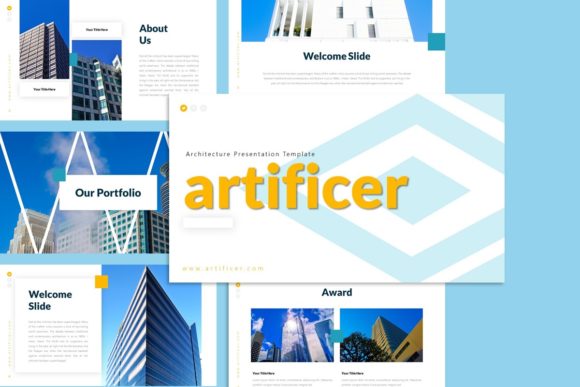
While the Artificer Architecture Presentation offers robust capabilities, prospective users should approach it with realistic expectations and preparation. First, it is vital to understand that the images seen in promotional previews are for demonstration purposes only and are not included in the downloadable files. Users must have their own high-quality imagery ready to populate the placeholders. Relying on low-resolution or poorly composed photos will undermine the premium feel of the template structure.
Additionally, while the template is easy to customize, users should possess a basic understanding of PowerPoint’s Master Slide functionality. Attempting to move locked elements on individual slides without understanding the master hierarchy can lead to frustration. Reading the included documentation file is strongly recommended before beginning major edits. This guide typically contains specific instructions on how to unlock elements, change color themes globally, and manage the vector icon library properly.
Users should also consider the context of their final output. If the presentation is intended for large-screen projection, the pixel-perfect nature of the template is a major asset. However, if the primary delivery method is email or mobile viewing, users may need to adjust font sizes or simplify certain infographic slides to ensure readability on smaller devices. The template provides the structure, but the user must provide the contextual adaptation.
Making the Right Choice for Your Project
Selecting a presentation template is ultimately about balancing aesthetic preference with functional requirements. The Artificer Architecture Presentation is best suited for users who value structural elegance and data clarity over decorative excess. It excels in scenarios where professionalism and organization are the primary messages. Whether you are a small business owner launching a new service, a student defending a thesis, or a creative director pitching a rebrand, this template offers a reliable starting point.
By leveraging the 35-slide library, native editing capabilities, and master slide architecture, users can shift their focus from fighting with formatting to refining their message. The goal of any presentation tool should be to reduce cognitive load for both the creator and the audience. When used correctly, this template facilitates that connection, allowing ideas to be presented with the precision and impact they deserve. Always verify that your version of PowerPoint supports the specific vector and master slide features utilized in the file to ensure a smooth editing experience from download to final delivery.