Educame Education Presentation Template Guide
Creating a compelling visual narrative is often the difference between a pitch that lands and one that falls flat. For professionals, educators, and entrepreneurs, the challenge usually lies not in having ideas, but in translating those ideas into a structured, visually engaging format without spending dozens of hours on design. The Educame Education Presentation Template addresses this specific friction point by providing a comprehensive framework that balances aesthetic appeal with functional utility. While the name suggests a focus on academic or training environments, the underlying architecture of this template makes it a versatile asset for creative agencies, corporate profiles, startups, and personal portfolios alike.
Understanding the practical application of this tool requires looking beyond the surface-level graphics. It is designed as a productivity instrument that standardizes high-quality design principles through Master Slides. This means that when you adjust a color palette or font hierarchy in one place, the changes propagate consistently across the deck. For users managing tight deadlines or multiple projects, this level of automation reduces cognitive load and ensures brand consistency, allowing you to focus entirely on refining your message rather than aligning text boxes.
Streamlining Content Creation with Master Slides
The core efficiency of the Educame Education Presentation Template stems from its reliance on Master Slides. Many presenters struggle with "slide drift," where formatting becomes inconsistent after several rounds of edits. By building the 36 included slides on a master foundation, this template enforces visual discipline. If you are preparing a quarterly business review or a semester curriculum, you can swap out content while trusting that the margins, typography, and spacing remain pixel-perfect.
This feature is particularly valuable for teams where multiple stakeholders contribute to a single deck. Instead of reformatting individual slides manually, a team lead can update the master theme to reflect new branding guidelines, instantly bringing the entire presentation up to date. The drag-and-drop picture placeholders further accelerate this workflow. Rather than cropping and resizing images externally, users can drop assets directly into predefined frames that automatically mask and fit the content. This capability transforms image integration from a tedious technical task into a seamless part of the storytelling process.
Visualizing Complex Data Through Handcrafted Infographics
Data visualization is often where presentations fail. Generic chart tools rarely capture the nuance required for educational or strategic contexts. The Educame template includes handcrafted infographics specifically designed within PowerPoint. Unlike static images imported from external software, these graphics are fully editable vector elements. You can change colors, resize components, and modify data labels directly within the slide environment without losing resolution or clarity.
For a startup founder creating a pitch deck, this means being able to tailor market size visuals or growth projections to match the exact tone of the verbal presentation. An educator explaining a complex biological process or historical timeline can adapt these infographics to simplify information without resorting to dense paragraphs of text. Because all graphics are resizable and editable, they scale effectively whether you are presenting on a laptop screen or projecting onto a large auditorium wall. This flexibility ensures that your visual aids support your narrative rather than distracting from it with poor formatting or pixelation.
Adapting the Framework Across Diverse Industries
Although marketed with an education-first label, the structural versatility of the Educame Education Presentation Template allows it to serve distinct professional needs. The 36-slide library covers a broad spectrum of layouts, from team introductions and service overviews to portfolio showcases and financial summaries. This breadth makes it a viable option for various user personas who need professional results without hiring a dedicated designer.
- Creative Agencies and Portfolios: The clean, grid-based layouts provide ample whitespace for photography and case studies. Agencies can use the portfolio-specific slides to showcase client work with a consistent frame, ensuring the design of the presentation does not compete with the creative work being displayed.
- Corporate and Business Profiles: For internal communications or B2B sales, the template offers structured layouts for company history, mission statements, and organizational charts. The professional aesthetic helps maintain credibility during stakeholder meetings.
- Startups and Pitch Decks: Investors expect clarity and brevity. The template’s problem-solution and market analysis slides provide a logical flow that guides investors through a narrative arc, reducing the risk of omitting critical information.
- Educators and Trainers: Beyond traditional classrooms, this serves corporate trainers and workshop facilitators who need modular content blocks that can be rearranged based on audience engagement levels or time constraints.
When adapting this template for non-educational purposes, users should leverage the documentation file included in the package. It provides guidance on maximizing the utility of the vector icons and layout variations, ensuring that the transition from an academic style to a corporate or creative tone is smooth and intentional.
Technical Considerations and Asset Management
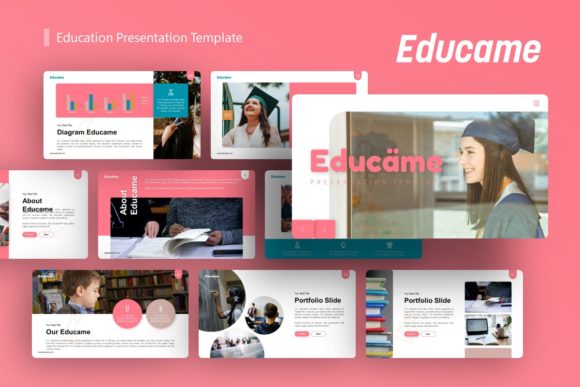
A crucial aspect of using any digital template is understanding what is actually delivered versus what is shown in marketing previews. When downloading the Educame Education Presentation Template, users receive the PowerPoint .PPTX file, a documentation guide, and a set of vector icons. It is important to note that all images seen in the demo are for preview purposes only and are not included in the final files. This distinction matters for project planning; you must have your own high-quality photography or stock assets ready to populate the placeholders.
This exclusion is actually a benefit for professional users. Stock photos included in templates often look generic and dated, which can undermine the perceived value of a presentation. By requiring users to source their own imagery, the template encourages authenticity and relevance. However, this does mean you should budget time for asset gathering. Ensure your images meet the resolution requirements implied by the "pixel-perfect" illustrations to avoid blurriness when projected. The vector icons included help bridge gaps where custom photography isn't available, providing a cohesive visual language for abstract concepts.
Evaluating Fit and Maximizing Value
While the Educame Education Presentation Template offers significant advantages, it is not a universal solution for every scenario. Users should assess their specific needs against the template's strengths. If your presentation requires highly specialized technical diagrams or industry-specific compliance tables not covered by the general infographic set, you may need to supplement this template with custom design work. Similarly, if your brand guidelines are extremely rigid regarding color usage and typography, verify early on that the Master Slide structure allows for the degree of customization your organization requires.
For freelancers and small business owners operating with limited resources, this template represents a high-return investment. It bridges the gap between free, low-quality templates and expensive custom design services. The key to realizing this value lies in treating the template as a system rather than a collection of pretty slides. Invest time upfront to customize the Master Slides with your brand colors, fonts, and logo placement. Once this foundation is set, future presentations become an exercise in content insertion rather than design creation.
Ultimately, the goal of using a tool like Educame is to enhance communication efficiency. Whether you are teaching a class, pitching a product, or showcasing a creative portfolio, the visual container should facilitate understanding, not hinder it. By leveraging the editable infographics, master slide consistency, and versatile layout options, professionals can produce polished, effective presentations that respect both their own time and their audience's attention. The template succeeds not because it automates creativity, but because it removes the technical barriers that often prevent good ideas from being communicated clearly.