Elevating Your Narrative with the Labora Business Presentation Template
Creating a compelling visual narrative often feels like a balancing act between aesthetic appeal and functional clarity. For professionals ranging from startup founders to creative directors, the Labora Business Presentation Template serves as a versatile foundation that bridges this gap. Rather than starting from a blank slide, which can lead to hours of formatting frustration, Labora provides a structured yet flexible environment designed to adapt to specific communication goals. It is more than just a collection of slides; it is a strategic tool for organizing complex information into digestible, visually engaging formats that respect both the presenter's time and the audience's attention span.
Real-World Applications Across Industries
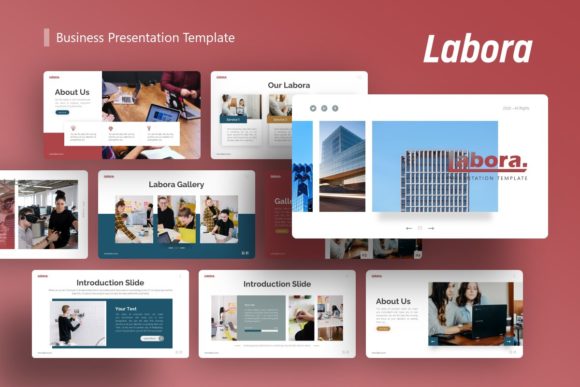
The true value of a presentation template lies in its adaptability. While many templates are niche-specific, Labora is engineered for cross-industry utility. Understanding how different professionals leverage these 36 slides can help you visualize its potential for your own projects.
Startup Pitch Decks and Investor Relations
For entrepreneurs seeking funding, the margin for error is slim. Investors review dozens of decks weekly, making visual consistency and data clarity paramount. The Labora Business Presentation Template excels here through its handcrafted infographics. Instead of struggling to align shapes and text boxes manually, founders can utilize pre-designed data visualization slides to present market size, revenue projections, and user growth metrics. These pixel-perfect illustrations ensure that financial data looks professional rather than improvised. The master slide architecture allows for global changes, meaning if you need to update your brand color or logo across all 36 slides, it happens instantly, ensuring pitch-perfect consistency during high-stakes meetings.
Creative Agency Portfolios and Case Studies
Agencies face a unique challenge: their presentation deck must demonstrate design prowess without overshadowing the client work being showcased. Labora addresses this with clean, minimalist layouts that prioritize image placeholders. Creative teams can use the drag-and-drop functionality to insert high-resolution campaign photography or UI mockups without breaking the layout grid. The template acts as a subtle frame, guiding the viewer’s eye through case studies logically—from the initial brief to the final results—while maintaining a cohesive agency identity throughout the proposal or portfolio review.
Corporate Reporting and Internal Communication
In corporate environments, presentations often suffer from "death by PowerPoint." Department heads and managers can use Labora to transform dry quarterly reports into engaging narratives. The variety of slide layouts prevents visual fatigue, allowing presenters to alternate between text-heavy analysis, visual summaries, and team highlights. Because the content is fully editable and resizable, corporate users can tailor the density of information to suit executive summaries or detailed operational reviews. The included vector icons add a layer of polish to internal communications, signaling professionalism even in routine updates.
Navigating Customization and Workflow Efficiency
Adopting a new template should streamline your workflow, not complicate it. Labora is built on Master Slides, a feature that significantly reduces editing time. When you modify a Master Slide, those changes propagate to every associated layout. This is particularly useful when rebranding or adjusting typography standards mid-project. However, maximizing efficiency requires understanding the file structure before diving in.
The documentation file included with the download is an essential resource. It outlines how to manipulate the picture placeholders and edit the vector graphics effectively. Users familiar with PowerPoint will find the learning curve gentle, but those accustomed to other software should take a moment to review the guide to avoid common pitfalls, such as accidentally ungrouping complex infographic elements. The ability to resize all graphics without losing quality means you can confidently adapt the template for different aspect ratios or print formats without worrying about pixelation.
Strategic Considerations Before Implementation
While the Labora Business Presentation Template offers robust features, successful implementation depends on aligning the tool with your specific context. There are practical considerations to keep in mind to ensure the final output meets expectations.
Asset Management and Licensing
A critical detail for new users is understanding asset inclusion. All images seen in the demo are for preview purposes only and are not included in the downloadable files. This is standard practice, but it necessitates preparation. Before opening the template, curate your own library of high-quality, licensed imagery that matches your brand guidelines. Having these assets ready ensures that the drag-and-drop process remains smooth. Relying on low-resolution or watermarked stock photos as placeholders can undermine the premium feel of the template, so investing time in asset selection upfront pays dividends in the final presentation quality.
Balancing Structure with Brand Identity
Templates provide structure, but your brand provides soul. There is a risk of over-relying on the default styling, which can make your presentation look generic. Use Labora as a skeleton, not a skin. Customize the color palette to match your exact brand codes, adjust font weights to reflect your tone of voice, and rearrange slide orders to fit your unique narrative arc. The 36 slides offer ample variety, but you likely won't need all of them. Curating a subset of slides that best serve your story is often more effective than forcing content into ill-fitting layouts just to utilize the full template.
Technical Compatibility and Output
Since Labora is delivered as a .PPTX file, compatibility is generally excellent across modern versions of Microsoft PowerPoint. However, if you plan to present on Keynote or Google Slides, some advanced animations or specific font renderings may shift. Always test your presentation in the actual environment where it will be delivered. If presenting remotely via screen share, verify that the pixel-perfect illustrations remain legible at smaller resolutions. The resizable nature of the graphics helps mitigate this, but a technical rehearsal is non-negotiable for important events.
Maximizing Impact Through Visual Hierarchy
Beyond mere aesthetics, the Labora Business Presentation Template facilitates better information architecture. Good design guides the audience through a logical progression of ideas. The handcrafted infographics are not just decorative; they are cognitive aids that help viewers process statistics and relationships faster than text alone. When selecting slides, consider the cognitive load of your audience. Alternate between high-impact visual slides and simpler text slides to create a rhythm that maintains engagement.
For personal portfolios, this hierarchy helps potential employers or clients quickly identify key skills and achievements. For business proposals, it ensures that value propositions stand out against technical specifications. By leveraging the template’s built-in visual hierarchy, you reduce the effort required for your audience to understand your message, thereby increasing the likelihood of a positive outcome.
Ultimately, the Labora Business Presentation Template is a productivity multiplier. It removes the friction of design mechanics, allowing professionals to focus entirely on crafting a persuasive, authentic message. Whether you are pitching a disruptive tech startup, showcasing a photography portfolio, or reporting to a board of directors, the template provides the professional scaffolding necessary to deliver your ideas with confidence and clarity. By respecting the tool’s capabilities and preparing your assets thoughtfully, you transform a standard file download into a powerful communication asset tailored to your unique professional journey.