Musara Presentation Template: Design for Impact
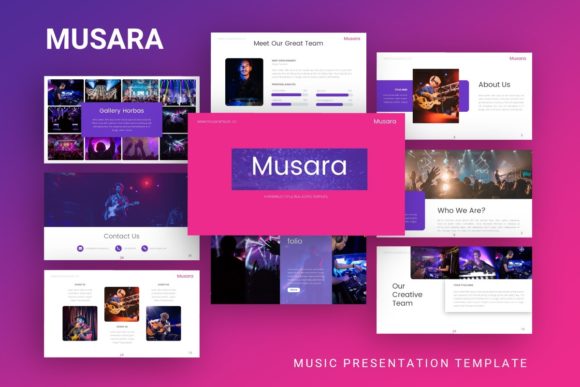
Creating a compelling narrative often hinges on the visual framework that supports it. The Presentation Template - Musara offers a sophisticated foundation for professionals who need to communicate complex ideas with clarity and aesthetic precision. Unlike generic slide decks that force content into rigid boxes, Musara is engineered to adapt to your specific storytelling needs. Whether you are pitching a startup concept, showcasing a photography portfolio, or outlining a corporate strategy, this template provides the structural integrity and visual flexibility required to maintain audience engagement from the first slide to the last.
The true value of Musara lies in its balance between artistic expression and functional design. It avoids the common pitfall of prioritizing decoration over readability. Instead, it utilizes a master slide system that ensures consistency across all 35 slides while allowing for granular customization. This means you can spend less time aligning text boxes and adjusting color palettes, and more time refining your message. For creators and business leaders alike, this efficiency translates directly into a more polished final product and a more confident delivery.
Versatile Applications Across Industries
One of the most significant advantages of the Presentation Template - Musara is its agnostic design language. It does not scream "music" despite its name; rather, it embodies rhythm, flow, and modern minimalism. This makes it exceptionally useful across a wide spectrum of professional contexts. Understanding how to leverage this versatility is key to maximizing your return on investment.
Creative Agencies and Portfolios
For designers, photographers, and creative directors, the portfolio presentation is a critical touchpoint. Musara’s pixel-perfect illustrations and resizable graphics serve as a neutral yet elegant backdrop for visual work. The picture placeholders are designed with drag-and-drop functionality, allowing you to swap preview images with your own high-resolution assets instantly. Because the layout respects negative space, your artwork remains the focal point without competing with heavy UI elements. Consider using the infographic slides to break down your creative process or case studies, giving potential clients insight into your methodology alongside your final deliverables.
Startup Pitch Decks and Business Proposals
Entrepreneurs and marketers face the challenge of distilling dense data into digestible insights. Musara includes handcrafted infographics specifically built within PowerPoint, meaning they are fully editable vector shapes rather than static images. You can adjust charts, graphs, and diagrams to reflect your actual metrics without needing external software like Illustrator. For a pitch deck, utilize the clean typography and structured layouts to guide investors through your problem-solution narrative. The template’s professional aesthetic signals competence and attention to detail, subtle psychological cues that can influence stakeholder confidence during high-stakes meetings.
Corporate Profiles and Internal Reporting
In corporate environments, consistency is paramount. Musara’s reliance on Master Slides allows organizations to update branding elements globally. If your company rebrands or updates its color scheme mid-year, you can apply these changes across the entire deck in seconds. This feature is invaluable for teams that produce regular reports, training materials, or internal updates. The 35-slide variety ensures you have appropriate layouts for team introductions, financial overviews, project timelines, and strategic goals, maintaining a cohesive visual identity across different departments and presentations.
Maximizing Customization and Workflow Efficiency
Owning a premium template is only the first step; mastering its customization features is what separates amateur slides from professional communications. The Presentation Template - Musara is built to be modified, but effective modification requires a strategic approach. Here are practical recommendations for adapting the files to your unique requirements while maintaining design integrity.
- Leverage Master Slides for Global Changes: Before editing individual slides, always check the Slide Master view. Adjusting fonts, logo placement, or footer information here propagates changes throughout the deck. This prevents the "frankendeck" effect where different slides have mismatched formatting.
- Utilize Vector Icons Strategically: The included vector icon set is a valuable asset for visual shorthand. Use these icons to create consistent bullet points or to represent abstract concepts in your infographics. Because they are vectors, they remain crisp at any size and can be recolored to match your brand palette exactly.
- Respect the Grid System: Musara’s layouts are based on a precise grid. When adding new elements or resizing existing ones, hold the Shift key to maintain proportions and use alignment guides to keep content anchored. Deviating from the grid can make even beautiful slides look unprofessional.
- Curate Your Imagery: Remember that demo images are for preview purposes only. Replace them with high-quality, relevant visuals that support your narrative. Avoid stretching low-resolution images; instead, crop them to fit the placeholder dimensions or source better assets. Visual quality directly impacts perceived credibility.
Strategic Content Organization
A beautiful template cannot save a disorganized message. When working with Musara, treat the 35 slides as a toolkit rather than a checklist. You do not need to use every slide, nor should you feel compelled to follow the default order. Start by outlining your core narrative arc, then select the specific layouts that best serve each section of your story.
For educational content or workshops, alternate between text-heavy explanation slides and visual summary slides to manage cognitive load. The handcrafted infographics are particularly effective here for recapping key takeaways. For personal portfolios, prioritize large-format image slides and use text slides sparingly for context. In business contexts, ensure that every data visualization has a clear headline stating the insight, not just the metric. Musara’s clean typography hierarchy supports this practice, making it easy for audiences to scan and retain critical information.
Technical Considerations and Best Practices
To ensure your Presentation Template - Musara performs flawlessly across different devices and platforms, adhere to a few technical best practices. Always embed custom fonts if you deviate from standard system typefaces, or stick to the recommended font pairings included in the documentation file. This prevents text reflow issues when presenting on a computer that lacks your specific fonts.
When exporting for distribution, consider your audience’s needs. A live presentation might benefit from embedded videos and transitions, while a PDF handout should focus on static clarity. Musara’s fully editable nature means you can maintain two versions: a dynamic deck for speaking and a streamlined document for reading. Additionally, keep your source .PPTX file organized. Rename slides in the selection pane and group related elements. This housekeeping pays dividends when you return to update the presentation months later.
Elevating Your Visual Communication
Ultimately, the goal of using a tool like Musara is to reduce friction between your ideas and your audience’s understanding. By providing a professionally designed, easily customizable framework, it frees you to focus on what matters most: your content. Whether you are a freelancer building your personal brand, an educator explaining complex topics, or an executive driving organizational change, this template serves as a reliable partner in your creative process.
Approach your next presentation not as a chore, but as an opportunity to craft a meaningful experience. With the Presentation Template - Musara, you have the structural support to make that experience both visually stunning and substantively effective. Invest the time to learn its features, adapt its layouts to your authentic voice, and watch how improved design elevates the impact of your message. Good design is invisible when done well; it simply lets your ideas shine. That is the promise of Musara, and it is a promise worth keeping for every important conversation you facilitate.