Evaluating Presentation Template - Galore for Professional and Creative Use
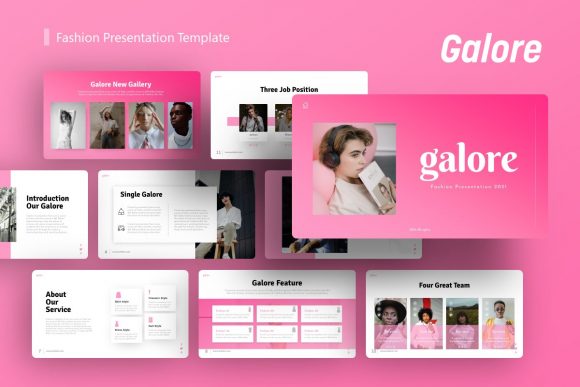
Selecting the right visual framework for a pitch deck, company profile, or portfolio requires balancing aesthetic appeal with functional adaptability. While many templates prioritize style over substance or vice versa, Presentation Template - Galore attempts to bridge this gap by offering a comprehensive suite designed for diverse professional needs. When researching options for your next project, it is essential to look beyond preview images and understand the structural capabilities of the file. This template distinguishes itself through a specific combination of volume, technical architecture, and versatility that warrants careful consideration against other market alternatives.
Core Architecture and Customization Capabilities
The primary value proposition of Presentation Template - Galore lies in its underlying construction rather than just its surface design. The template includes 36 unique slides per variation, providing a substantial library of layouts without becoming unmanageable. For professionals comparing resources, this slide count represents a "sweet spot." Templates with fewer than 20 slides often force users to duplicate and heavily modify existing layouts, leading to inconsistency. Conversely, mega-packs with over 100 slides can suffer from bloat, making navigation difficult and increasing file size unnecessarily.
A critical differentiator for this resource is its reliance on Master Slides. In many lower-quality alternatives, formatting is applied directly to individual objects, meaning a font change or color update must be performed manually on every single slide. Presentation Template - Galore utilizes proper master slide hierarchy. This ensures that global changes propagate instantly across the entire deck. If you are managing a corporate identity or rebranding a startup pitch, this feature significantly reduces production time and minimizes formatting errors. When evaluating any template, always verify if it uses true master slides or merely grouped objects; the latter will consume far more billable hours during customization.
Furthermore, the inclusion of handcrafted infographics within PowerPoint sets this template apart from those relying solely on external plugins or static imagery. Because these graphics are native vector elements, they remain editable and resizable without pixelation. Users can adjust data visualization components directly within the presentation software, maintaining workflow continuity. This contrasts with templates where charts are embedded as flat images, requiring users to recreate them from scratch if data points change.
Versatility Across Different Professional Contexts
Presentation Template - Galore is marketed for a broad spectrum of use cases, including Creative Agencies, Corporate Business, Portfolios, Photography, Pitch Decks, and Startups. However, practical application varies by context. Understanding where this template excels versus where specialized tools might be superior is key to making an informed decision.
Creative Agency and Portfolio Applications
For creative professionals, the template offers robust image handling via drag-and-drop placeholders. This functionality streamlines the process of swapping preview assets with actual work samples. The pixel-perfect illustrations and clean typography support high-impact visual storytelling without overwhelming the content. Compared to minimalist portfolio templates that may lack structure, Galore provides enough layout variety to showcase case studies, team bios, and service offerings cohesively. However, photographers requiring full-bleed, edge-to-edge gallery layouts might find standard 16:9 aspect ratio templates limiting compared to dedicated photography portfolios designed specifically for print or web-scroll formats.
Corporate Profiles and Business Reporting
In corporate environments, consistency and data clarity are paramount. The template’s structured approach to text and data visualization supports annual reports, internal updates, and B2B proposals effectively. The ability to resize all graphic elements ensures that branding guidelines regarding whitespace and margin safety are maintained even when content density changes. When compared to generic business templates, Galore offers a more modern aesthetic that avoids the dated "clip art" look while remaining professional enough for stakeholder meetings. It strikes a balance between creative flair and corporate restraint, which is often difficult to find in free or low-cost alternatives.
Startup Pitch Decks
For startups, speed and narrative flow are critical. Having 36 pre-designed slides allows founders to assemble a credible deck rapidly. The inclusion of specific infographic styles helps visualize market size, traction, and business models without hiring a designer immediately. However, entrepreneurs should note that while the template provides the visual container, it does not replace strategic content development. Specialized pitch deck services or consultants offer narrative coaching that a template cannot provide. Galore is best viewed as a production accelerator for teams who already have their story defined but lack the design bandwidth to execute it visually.
Comparative Analysis: Strengths and Tradeoffs
No single resource is universally optimal. When weighing Presentation Template - Galore against alternatives, consider the following tradeoffs based on typical user priorities.
- Editability vs. Uniqueness: Galore prioritizes editability through master slides and vector graphics. This makes it highly efficient for iterative work. However, because it is a commercial template, there is a non-zero chance of visual overlap with other users. Bespoke custom design guarantees uniqueness but costs significantly more. If brand exclusivity is the highest priority, a template is a starting point, not a final solution.
- Native Features vs. Plugin Dependency: Some advanced templates require third-party add-ons to function correctly. Galore operates entirely within native PowerPoint features (.PPTX). This enhances compatibility and reduces technical friction but may limit cutting-edge animation effects found in plugin-dependent alternatives.
- Volume vs. Curation: With 36 slides, users get breadth. Specialized niche templates (e.g., medical or financial specific) might offer deeper industry-specific diagrams but less general flexibility. Galore is a generalist tool; it adapts well but lacks pre-built regulatory compliance tables or specialized engineering schematics found in vertical-specific products.
- Asset Inclusion: It is vital to manage expectations regarding media. As noted in the product specifications, demo images are for preview purposes only and are not included. Users must supply their own photography. Alternatives bundled with stock photo subscriptions offer immediate readiness but often at a higher price point or recurring cost. Galore assumes the user has access to their own visual assets or separate stock licensing.
Technical Specifications and File Management
Understanding the deliverables prevents post-purchase friction. Presentation Template - Galore includes the .PPTX file, documentation, and vector icons. The documentation file is particularly valuable for users unfamiliar with master slide editing or placeholder manipulation. Skipping this step is a common error that leads to perceived usability issues.
The vector icon set adds significant utility. Icons serve as visual anchors that break up text-heavy slides and improve information retention. Having a cohesive icon pack included ensures stylistic consistency, whereas sourcing icons individually often results in mismatched line weights and fill styles. When comparing options, check whether icons are editable vectors or rasterized PNGs; only vectors allow for color matching to your specific brand palette.
All graphics being resizable and editable is a non-negotiable feature for professional output. Rasterized elements degrade when scaled for different display resolutions or printed materials. Galore’s commitment to vector-based illustrations future-proofs the asset for various outputs, from mobile screens to large-format projections.
Determining Fit: When to Choose This Template
Presentation Template - Galore is likely the appropriate choice if your project meets several of the following criteria:
- You need a versatile foundation that can serve multiple departments or clients without purchasing separate licenses for each use case.
- Your team possesses intermediate PowerPoint skills and can leverage master slides efficiently.
- You require a balance of creative expression and structured data presentation.
- Budget constraints preclude custom design, but quality standards exceed free template offerings.
- You have existing brand assets (photos, logos, colors) ready to integrate.
Conversely, readers should explore alternative solutions if:
- The project requires highly specialized industry diagrams not covered by general business infographics.
- You lack access to quality photography and need a bundle that includes licensed imagery.
- The presentation requires complex, interactive animations beyond standard transitions.
- Absolute visual exclusivity is required for a high-stakes public launch.
Making an Informed Selection
Ultimately, the decision to utilize Presentation Template - Galore should be driven by workflow efficiency and alignment with project scope. Its strength lies in being a reliable, well-architected middle ground between rigid simplicity and chaotic complexity. By offering 36 thoughtfully constructed slides with native editability, it serves as a pragmatic tool for professionals who value time without sacrificing polish.
When conducting your final evaluation, test the master slide functionality and placeholder behavior before committing. Ensure the aesthetic tone aligns with your audience's expectations, whether that is a conservative corporate board or a dynamic creative client. Remember that a template is a vessel for your content; its effectiveness depends entirely on how well its structural features support your specific narrative goals. By focusing on technical fit and practical application rather than just visual preview, you can select a resource that delivers long-term value across multiple presentations.