Evaluating Presentation Template - Wolife for Professional and Creative Use Cases
Selecting the right visual framework for a business presentation often involves balancing aesthetic appeal with functional flexibility. For professionals aged 20 to 50 navigating corporate environments, startup ecosystems, or creative agencies, the choice of template dictates not only how information is perceived but also how efficiently it can be updated. The Presentation Template - Wolife has emerged as a notable option in this space, specifically designed to bridge the gap between rigid corporate structures and fluid creative portfolios. Understanding its specific architecture, feature set, and limitations is essential for determining whether it aligns with your current project requirements or if an alternative approach would serve you better.
Defining the Scope and Versatility of Wolife
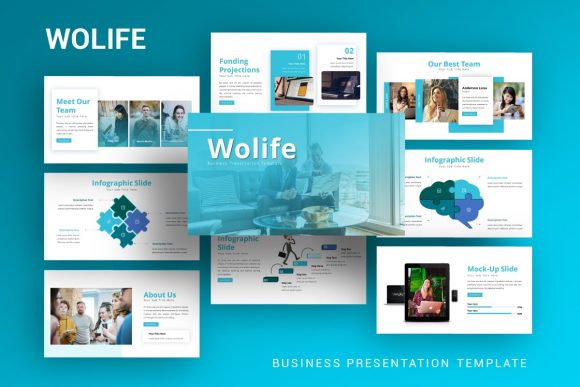
At its core, Presentation Template - Wolife is a comprehensive PowerPoint (.PPTX) asset built to accommodate a wide spectrum of professional narratives. Unlike niche templates designed solely for financial reporting or exclusively for artistic showcases, Wolife positions itself as a hybrid solution. It includes 35 distinct slides per template, providing enough variety to construct a full-length pitch deck, company profile, or personal portfolio without requiring external assets. This volume of content is significant when compared to minimalist templates that may offer only 10 to 15 slides, forcing users to duplicate layouts repetitively.
The template’s versatility stems from its intended use cases, which span Creative Agency, Company Profile, Corporate and Business, Portfolio, Photography, Pitch Deck, Startup, and Personal Portfolio sectors. For a user evaluating this resource, the critical question is not just "what does it look like?" but "does it support my specific narrative structure?" If you are preparing a data-heavy quarterly review, the handcrafted infographics included in Wolife provide a structured way to visualize metrics. Conversely, if you are a photographer building a personal brand, the image placeholders and clean typography allow the visual work to take precedence over decorative elements. This duality makes it distinct from single-purpose themes that lack the structural depth for cross-functional use.
Technical Architecture and Customization Efficiency
For professionals who must frequently update decks, the underlying technical construction of a template matters more than its initial visual impact. Wolife is based on Master Slides, a fundamental PowerPoint feature that many lower-quality templates neglect. When a template utilizes Master Slides correctly, global changes—such as updating a logo, changing a color scheme, or adjusting font hierarchy—can be applied across all 35 slides simultaneously. In contrast, templates lacking this architecture require manual editing on a slide-by-slide basis, significantly increasing the time investment for maintenance.
Furthermore, the inclusion of pixel-perfect illustrations and fully resizable vector graphics addresses a common pain point in presentation design: scalability. Rasterized images often become blurry when resized or projected on high-definition screens. Because Wolife’s graphical elements are vector-based and editable within PowerPoint, they maintain crispness regardless of dimension adjustments. This is particularly relevant for users comparing Wolife against Canva or web-based design tools; while those platforms offer ease of use, they sometimes export static assets that cannot be manipulated natively in PowerPoint. Retaining native editability ensures that the file remains a living document rather than a static artifact.
Assessing the Handcrafted Infographic Advantage
Data visualization is often the most time-consuming aspect of deck creation. Wolife distinguishes itself by including handcrafted infographics directly within the PowerPoint environment. When evaluating this feature against alternatives, consider the tradeoff between convenience and customization. Generic chart tools in Excel or PowerPoint are functional but often aesthetically disjointed from modern design trends. Third-party infographic software offers superior visuals but creates compatibility issues when importing back into a slide deck.
Wolife’s approach integrates these two needs. The infographics are pre-styled to match the theme yet remain fully editable. This means you can adjust data points and colors without breaking the visual consistency. However, users should be aware that "handcrafted" implies a specific design language. If your organization adheres to strict brand guidelines that differ significantly from Wolife’s default aesthetic, the time required to restyle these infographics may negate the convenience factor. In such cases, a blank slate template with robust charting tools might be a more efficient starting point than adapting a heavily stylized asset.
Comparative Analysis: Wolife vs. Alternative Solutions
To make an informed decision, it is necessary to contextualize Presentation Template - Wolife within the broader landscape of presentation resources. Users typically compare this type of premium template against three main categories: free marketplace downloads, subscription-based design platforms, and custom agency design.
- Versus Free Templates: Free options often suffer from inconsistent master slides, low-resolution assets, and limited slide counts. Wolife’s 35-slide count and vector assets offer a higher baseline of quality and longevity. The investment here is justified by reduced frustration and professional polish.
- Versus Subscription Design Platforms: Web-based tools excel at collaboration and asset libraries but can create vendor lock-in. Wolife provides a standalone .PPTX file with documentation, ensuring ownership and offline accessibility. For corporate environments with strict IT security or offline presentation requirements, the local file format of Wolife is often superior to cloud-dependent alternatives.
- Versus Custom Design: Hiring a designer guarantees uniqueness but comes with high costs and longer lead times. Wolife serves as a middle ground, offering professional-grade aesthetics at a fraction of custom pricing. It is ideal for startups and agencies that need high-quality output quickly but do not yet have the budget for bespoke branding.
Decision Factors: When Wolife Is the Right Fit
Evaluating whether to adopt Presentation Template - Wolife requires an honest assessment of your workflow and audience. The template is likely the optimal choice if you fall into specific user profiles. Startups preparing for seed funding will benefit from the dedicated Pitch Deck layouts that follow standard investor narrative arcs. Freelancers and creatives building personal portfolios will appreciate the photography-centric slides that prioritize visual hierarchy. Corporate teams needing a refreshed internal reporting template will find the Master Slide architecture efficient for recurring updates.
Additionally, the inclusion of a Documentation File and Vector Icon set suggests that Wolife is designed for users who want self-sufficiency. If you prefer to solve design problems independently without waiting for external support, these resources add tangible value. The drag-and-drop picture placeholders further reduce the technical barrier, making it accessible for team members who may not be design experts but need to contribute content.
Recognizing Limitations and Tradeoffs
No template is universally perfect, and recognizing Wolife’s limitations is crucial for avoiding buyer’s remorse. First, prospective users must understand that all images shown in the demo are for preview purposes only and are not included in the download. This is standard industry practice, but it means you must have your own high-quality photography or stock assets ready. If you lack original imagery, the template may look sparse until populated, potentially creating a discrepancy between expectation and reality.
Secondly, while 35 slides provide breadth, they may not cover every niche scenario. Highly specialized industries, such as medical research or complex engineering, may find the generalist nature of Wolife insufficient for technical diagrams. In these instances, industry-specific templates or custom illustration work would be more appropriate. Furthermore, because the graphics are handcrafted, they carry a distinct stylistic signature. If your goal is complete visual neutrality or adherence to a legacy brand system that conflicts with this style, extensive modification will be required.
Practical Implementation and Best Practices
To maximize the return on investment when using Presentation Template - Wolife, users should adopt a strategic implementation approach. Begin by auditing the Master Slides before adding any content. Establishing your color palette and typography rules at the master level prevents rework later. Utilize the included vector icons to create custom composite graphics rather than relying solely on the pre-made infographics; this increases uniqueness while maintaining asset consistency.
When comparing Wolife to other options during the selection process, download the documentation file first if available, or review the feature list critically. Verify that the "easy customizable contents" claim holds true by checking for grouped objects and unlocked layers. A truly professional template facilitates editing rather than hindering it. Finally, consider the long-term lifecycle of the presentation. If this deck will be updated quarterly for years, the structural integrity of Wolife’s Master Slides offers sustainable value that outweighs the initial allure of flashier, less robust free alternatives.
Ultimately, Presentation Template - Wolife represents a balanced solution for professionals seeking efficiency without sacrificing aesthetic quality. By weighing its 35-slide versatility and vector editability against your specific content needs and brand constraints, you can determine if it is the correct tool for your next communication challenge. Whether for a startup pitch, a creative portfolio, or a corporate overview, the decision should hinge on practical utility and alignment with your operational workflow rather than visual novelty alone.