Evaluating the Easton Creative Presentation Template for Professional Use
In the landscape of digital communication, the efficiency with which a professional can assemble a compelling narrative is often just as important as the narrative itself. The Easton Creative Presentation Template enters this space not merely as a collection of slides, but as a structured framework designed to bridge the gap between raw data and visual storytelling. For professionals ranging from agency directors to freelance photographers, the primary value proposition lies in its architectural flexibility. Rather than forcing content into rigid pre-set layouts, this template system utilizes a master slide infrastructure that allows for global, consistent changes across multiple formats without breaking individual slide integrity.
When assessing presentation assets for business or creative use, one must look beyond surface aesthetics to evaluate underlying usability. The Easton Creative Presentation Template distinguishes itself through a balance of handcrafted design elements and practical editing capabilities. It addresses a common pain point in corporate and creative environments: the need for high-end design output without the recurring cost or timeline of hiring a dedicated graphic designer for every new pitch or report. By providing 36 distinct slides per template variant, it offers sufficient breadth to cover complex topics while maintaining a cohesive visual identity throughout the deck.
Core Architecture and Customization Capabilities
The technical foundation of any presentation template determines its long-term utility. A visually stunning template that is difficult to edit becomes obsolete after a single use. Easton is built on a Master Slide system within PowerPoint (.PPTX), which is the industry standard for scalable presentation design. This architecture means that fonts, color palettes, logo placements, and footer information can be adjusted globally. For agencies managing multiple client brands or startups iterating on their pitch decks weekly, this feature significantly reduces administrative friction.
Furthermore, the inclusion of handcrafted infographics sets this resource apart from generic slide packs. Many templates rely on stock vector art that feels disconnected from the slide layout. In contrast, the infographics in Easton are designed specifically for the presentation environment. They are fully resizable and editable vectors, meaning users can adjust data visualization to reflect actual metrics rather than being stuck with static placeholder charts. This level of granularity ensures that the visual representation of data remains accurate and proportional, a critical factor for business proposals and annual reports where precision signals competence.
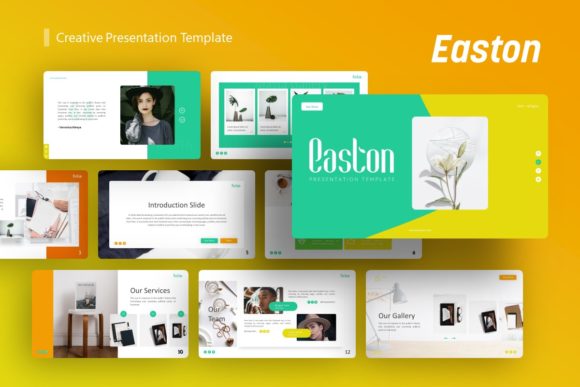
The "pixel-perfect" illustrations and graphic elements serve a dual purpose. Aesthetically, they provide a polished, modern look that aligns with current design trends. Functionally, they act as visual anchors that guide audience attention. Because these graphics are integrated into the master slides and layout guides, adding or removing them does not typically result in the alignment issues that plague lesser-quality templates. The picture placeholders utilize a drag-and-drop mechanism, streamlining the process of swapping preview images for actual project photography or product shots.
Sector-Specific Applications and Versatility
Versatility is often a buzzword in digital asset marketplaces, but in the case of Easton Creative Presentation Template, it is demonstrated through specific structural adaptations. The template’s neutrality allows it to function effectively across diverse verticals without requiring extensive redesign.
- Creative Agencies and Portfolios: For visual professionals, the template provides ample negative space and image-forward layouts. The grid systems are designed to showcase photography and design work without competing with it. This makes it suitable for capability statements, case study presentations, and personal portfolios where the work itself must remain the focal point.
- Corporate and Business Profiles: In more traditional settings, the template’s strength lies in its typography and information hierarchy. The text-heavy slides are formatted for readability, utilizing appropriate line spacing and font weights to make dense company profiles or operational overviews digestible. The clean aesthetic conveys professionalism without appearing sterile.
- Startups and Pitch Decks: Investors review hundreds of decks; clarity is paramount. Easton includes specific layouts tailored for problem/solution narratives, market sizing, and team introductions. The ability to quickly customize infographic slides allows founders to visualize their business model or traction metrics dynamically, adapting the deck for different investor meetings without starting from scratch.
- Education and Workshops: Educators and trainers benefit from the modular nature of the 36-slide library. Sections can be rearranged or removed to fit lesson plans of varying lengths. The visual consistency helps maintain student engagement, while the editable nature allows instructors to update content semester after semester.
Practical Workflow Integration and Asset Management
Adopting a new template involves an initial learning curve, and understanding the included files is essential for maximizing ROI. The Easton package includes the .PPTX file, comprehensive documentation, and a vector icon set. The documentation is particularly valuable for users who may not be PowerPoint power users; it typically outlines how to manipulate master slides, change color themes, and utilize the icon library effectively.
The inclusion of a separate vector icon file adds significant value. Icons are frequently needed to break up text or illustrate abstract concepts. Having a curated set that matches the template’s stroke weight and style prevents the visual dissonance that occurs when mixing icons from disparate sources. This attention to detail supports a unified brand experience, which is crucial for external-facing communications.
Users should note a standard industry practice regarding imagery: all photos seen in demo previews are for display purposes only and are not included in the downloadable files. While this requires users to source their own imagery, it is ultimately beneficial. It forces the customization necessary to make the presentation authentic. Relying on stock demo images often leads to generic-looking presentations that fail to resonate with specific audiences. Users should budget time for selecting high-quality, relevant imagery that complements the Easton layout structure rather than fighting against it.
Assessing Quality and Long-Term Value
When evaluating whether Easton Creative Presentation Template fits a specific workflow, consider the frequency of presentation needs. For a one-off event, a simpler free template might suffice. However, for professionals who present monthly or quarterly, the investment in a premium, master-slide-based system pays dividends in time savings and brand consistency.
The quality of the vector work suggests durability. Trends in presentation design shift, but clean, geometric, and well-spaced layouts tend to age gracefully. Easton avoids overly decorative elements that might date the presentation within a year. Instead, it focuses on foundational design principles—alignment, contrast, and hierarchy—that remain effective regardless of fleeting stylistic fads. This makes it a sustainable asset for businesses that need a reliable "house style" for internal and external communications.
Reliability also extends to cross-platform compatibility. As a native PowerPoint file, it avoids the rendering issues sometimes associated with Keynote conversions or web-based presentation tools. For corporate environments locked into the Microsoft ecosystem, this native compatibility ensures that animations, transitions, and editable charts function exactly as intended during live presentations. There is no risk of formatting shifts when moving between office computers or presenting on client hardware.
Limitations and Considerations for Prospective Users
While robust, no template is a universal solution. Prospective users should be aware of certain boundaries. The 36-slide count, while generous, is finite. Highly specialized technical presentations or academic defenses requiring unique diagramming may still require custom slide creation. Easton serves as an accelerator, not a replacement for bespoke design work in niche scenarios.
Additionally, the "easy customizable contents" claim assumes a baseline proficiency with PowerPoint. Users unfamiliar with Master Slides or vector editing may initially find the depth of customization overwhelming. It is advisable to review the documentation before beginning a major project. Those accustomed to simple drag-and-drop website builders may need to adjust their expectations regarding the manual control required in professional presentation software.
Finally, because the template is designed for broad appeal, it lacks industry-specific compliance formatting out of the box. Financial advisors, healthcare professionals, or legal consultants will need to add their own disclaimers, regulatory footers, and citation styles. The template provides the canvas, but the user must ensure the content meets their specific professional standards.
Determining Fit for Your Objectives
Ultimately, the decision to utilize Easton Creative Presentation Template should be driven by workflow requirements rather than aesthetic preference alone. If your goal is to establish a repeatable, professional presentation standard that scales across different projects and team members, this tool offers a solid infrastructure. It excels in environments where speed and consistency are valued equally with visual polish.
For freelancers and small business owners operating without a dedicated design department, it functions as a force multiplier, elevating the perceived value of their services through superior visual communication. For larger organizations, it serves as a compliant, brand-safe starting point that reduces rogue design practices and ensures messaging alignment. By understanding both its powerful master-slide architecture and its practical limitations, professionals can leverage Easton to transform routine presentations into strategic assets that support broader business goals.